

Hey there! I'm a supplier of drag conveyors, and today I'm stoked to share some insights on how to automate a drag conveyor. Drag conveyors are super useful in various industries, like agriculture, mining, and manufacturing. They're great for moving bulk materials from one place to another. But when it comes to boosting efficiency and productivity, automation is the name of the game.
Why Automate a Drag Conveyor?
Before we dive into the how - to, let's talk about why you'd want to automate your drag conveyor in the first place. First off, it can significantly increase efficiency. With automation, the conveyor can run at optimal speeds, reducing the time it takes to move materials. This means more output in less time, which is always a win for any business.
Secondly, automation improves safety. Manual operation of a drag conveyor can be risky, especially in harsh industrial environments. By automating the process, you can reduce the need for workers to be in close proximity to the moving parts, minimizing the risk of accidents.
Another big advantage is consistency. Automated systems can ensure that the conveyor moves materials at a steady pace and in a consistent manner. This is crucial for maintaining product quality, especially in industries where precision is key.
Step 1: Assess Your Needs
The first step in automating a drag conveyor is to figure out what you need. You gotta look at the type of materials you're moving. Are they heavy, light, abrasive, or fragile? This will determine the type of conveyor you have and the automation features you'll need.
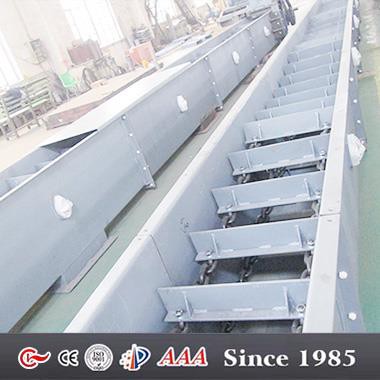
For example, if you're moving grain, a Grain Drag Conveyor Drag Chain Conveyor might be a great fit. Grain is relatively light but can be dusty, so you'll want a conveyor that can handle it gently and keep the dust under control.
You also need to consider the volume of materials. How much do you need to move per hour or per day? This will affect the size and capacity of the conveyor, as well as the speed at which it needs to operate.
Step 2: Choose the Right Sensors
Sensors are the eyes and ears of an automated drag conveyor system. They help the system understand what's going on and make smart decisions. There are several types of sensors you can use.
Proximity sensors are super handy. They can detect when materials are approaching the conveyor or when there's an object in the way. This helps prevent jams and ensures smooth operation.
Load sensors are another important type. They can measure the weight of the materials on the conveyor. This is useful for controlling the flow of materials and making sure the conveyor isn't overloaded.
Speed sensors are also crucial. They allow you to monitor and adjust the speed of the conveyor based on the needs of your operation. If you need to move materials faster or slower at different times, the speed sensor can make that happen.
Step 3: Install a Programmable Logic Controller (PLC)
A Programmable Logic Controller, or PLC, is like the brain of the automated drag conveyor system. It's a small computer that can be programmed to control the conveyor's operations.
The PLC receives input from the sensors and uses that information to make decisions. For example, if a proximity sensor detects that materials are piling up at one end of the conveyor, the PLC can slow down the conveyor or stop it temporarily to prevent a jam.
Programming the PLC might seem complicated, but there are plenty of resources available to help you out. You can find online tutorials, or you can hire a professional programmer if you're not comfortable doing it yourself.
Step 4: Implement a Human - Machine Interface (HMI)
A Human - Machine Interface, or HMI, is the control panel that allows operators to interact with the automated drag conveyor system. It's usually a touchscreen display that shows the status of the conveyor, such as its speed, the amount of materials being moved, and any error messages.
The HMI makes it easy for operators to adjust the settings of the conveyor. They can start and stop the conveyor, change the speed, and monitor the performance of the system. This gives operators more control and allows them to respond quickly to any issues that might arise.
Step 5: Integrate with Other Systems
If you have other equipment or systems in your facility, it's a good idea to integrate the automated drag conveyor with them. For example, if you have a packaging machine at the end of the conveyor, you can integrate the two systems so that the conveyor stops when the packaging machine is full or needs maintenance.
Integration can also help you optimize your overall production process. By sharing information between different systems, you can make sure that materials are moving smoothly through your entire facility.
Step 6: Test and Optimize
Once you've installed all the automation components, it's time to test the system. Start with a small amount of materials and run the conveyor at a slow speed. Check to make sure that all the sensors are working properly, the PLC is making the right decisions, and the HMI is easy to use.
During the testing phase, you might notice some issues or areas that need improvement. Maybe the conveyor is moving too fast and causing materials to spill, or the sensors are giving false readings. Don't worry; this is normal. Use these insights to optimize the system.
You can adjust the settings of the sensors, reprogram the PLC, or make changes to the HMI. Keep testing and tweaking until the system is running smoothly and efficiently.
Maintenance and Support
Automating a drag conveyor doesn't mean you can forget about maintenance. Regular maintenance is still essential to keep the system running in top condition. Make sure to clean the sensors, lubricate the moving parts, and check the electrical connections regularly.
If you run into any problems with the automated system, it's important to have access to support. As a drag conveyor supplier, I offer maintenance and support services to my customers. Whether it's troubleshooting a technical issue or providing software updates, I'm here to help.
Conclusion
Automating a drag conveyor can bring a whole bunch of benefits to your business, from increased efficiency and safety to better product quality. By following these steps - assessing your needs, choosing the right sensors, installing a PLC, implementing an HMI, integrating with other systems, and testing and optimizing - you can create a highly effective automated drag conveyor system.

If you're interested in automating your drag conveyor or need more information about our products and services, don't hesitate to reach out. We can work together to find the best solution for your specific needs. Let's take your business to the next level with an automated drag conveyor!
References
- Industrial Automation Handbook
- Conveyor System Design and Operation Guide